Integration · ConnectWise REST
ConnectWise REST API Integration for ITSupportPanel
Follow this guide to create the REST API (Integrator Login) required for ITSupportPanel to sync and create tickets in ConnectWise using secure API keys.
Prerequisites
| Permissions | Admin-level access in ConnectWise |
| API Member | A dedicated Integrator Login for ITSupportPanel |
| Security Role | System-level access recommended to avoid config errors |
| API Keys | Public & Private keys generated for the API Member |
Tip: The Private Key is shown only once. Store it immediately in a secure password vault.
Step 1
Create the ConnectWise API Member (Integrator Login)
- Go to System → Members.
- Open the API Members tab.
- Click + to add a new API Member.
- Set a Member ID (e.g., ITSP-API) and name.
- Assign a Security Role with sufficient system access (e.g. Admin)
- Save the new member.
Important:
If the system role is too restricted, ITSupportPanel won’t be able to read required configuration data.
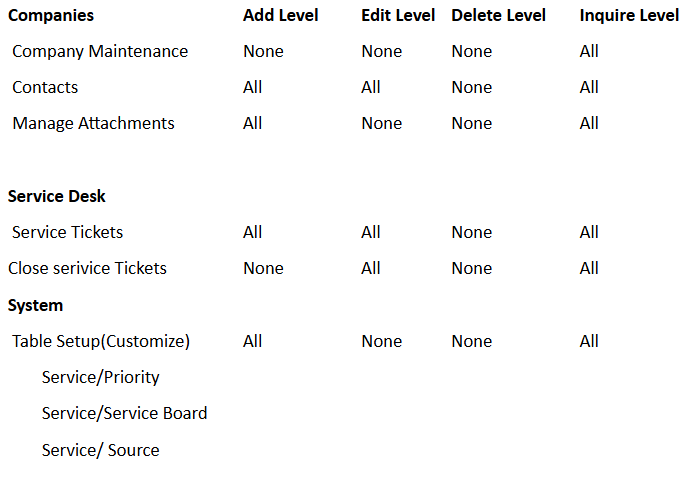 *: Read only permissions for configuration items (assets) is strongly advised
If the system role is too restricted, ITSupportPanel won’t be able to read required configuration data.
*: Read only permissions for configuration items (assets) is strongly advisedStep 2
Generate Public & Private API Keys
- Open the API Member created in Step 1.
- Go to the API Keys tab.
- Click + to create a new key pair.
- Enter a description (e.g., ITSupportPanel REST Key).
- Save and copy both keys.
Reminder: The Private Key cannot be retrieved later. If lost, you must regenerate a new pair.
Step 3
Enter API Details Into ITSupportPanel Setup Wizard
You will be asked for the following:
| Site URL | Your ConnectWise server address |
| Company ID | Shown on your CW login screen |
| Public Key | Generated in Step 2 |
| Private Key | Generated in Step 2 (store securely) |
Recommended
Configure a Ticket Source for ITSupportPanel
- Go to Setup Tables in ConnectWise.
- Search for Source.
- Click + to add a new source.
- Name it ITSP (or your preferred label).
- Save.
Source: Invarosoft ConnectWise REST Integration Documentation
Was this article helpful?
That’s Great!
Thank you for your feedback
Sorry! We couldn't be helpful
Thank you for your feedback
Feedback sent
We appreciate your effort and will try to fix the article