Create groups for push notifications
Creating groups for push notifications allows you to segment your audience and send targeted messages to specific groups. This ensures that your notifications are relevant and timely, reaching the right people with the right information. By organizing your audience into groups, you can enhance communication efficiency and improve user engagement.
Step 1
Log in to your admin portal
Step 2
Navigate to CxInvarosoft >> ITNewsPanel >> Push >> Groups

Step 3
Click on New Groups

* Alternatively, choose the Edit button if you already have a group

Step 4
Click on the Modify Members button to add or delete members

Step 5
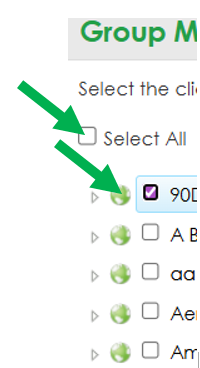
Choose the users or clients to add by clicking the checkboxes to select them.
Step 6
Important note: if you log in again and make changes, the previous ones will be removed. You must add everyone you want to include in a single modification.
Was this article helpful?
That’s Great!
Thank you for your feedback
Sorry! We couldn't be helpful
Thank you for your feedback
Feedback sent
We appreciate your effort and will try to fix the article