| ITSupportPanel · Troubleshooting |
Fix the "AgentBAD" agent status
This guide helps you fix agent activation errors such as Agent: Bad, AgentDisabled or a failed activation. In most cases, checking your licenses and then deactivating and reactivating the agent solves the problem.
The error usually looks like this:
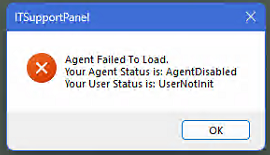
It typically happens for one of three reasons:
- The activation code doesn't exist or was mistyped.
- The activation code wasn't accepted.
- There are no licenses available to add a new agent.
| Check that you have licenses available |
Go to your Licenses Dashboard and make sure you have licenses available. If you don't, you have two options:
Delete agents yourself by following Deleting an Agent: Step-by-Step Instructions.
Or contact support to remove agents in bulk. We can remove agents that haven't connected in the last 30, 60, 90 or 120 days; just tell us which rule to apply.
Contact support to move to the next available license package.
| Deactivate and reactivate the agent |
Once you have licenses available, deactivate the agent and activate it again. You can do it in two ways:
Open a command prompt as administrator and deactivate the agent:
itsp.windows.service.exe deactivate
Wait 45 seconds, then activate it again, replacing ACTIVATION_CODE with the client's code:
itsp.windows.service.exe activate ACTIVATION_CODE
Not sure where to find the code? See Find the Client List: Obtain an activation code.
| Done.The agent is active again. The last step is to authenticate the user, so the agent is signed in as the right person: |
Was this article helpful?
That’s Great!
Thank you for your feedback
Sorry! We couldn't be helpful
Thank you for your feedback
Feedback sent
We appreciate your effort and will try to fix the article