Viewing Historical Agent Count per Client
This workflow explains how to view the historical number of agents associated with each client within an Invarosoft instance.
This number represents how many times the Invarosoft agent has been downloaded and activated on devices for a client over time.
This view is not related to:
Device reports
Warranty Wizard
Active agents
It only displays a historical count, with no additional device or agent details.
Step 1
Access the Instance. Go to https://portal.invarosoft.net/
Step 2
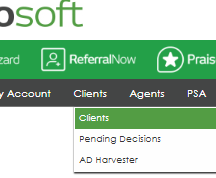
From the main navigation, go to the gray menu bar and select Clients → Clients
Step 3
In the Clients list, locate the column labeled Agents.
This column shows a single historical number per client

Was this article helpful?
That’s Great!
Thank you for your feedback
Sorry! We couldn't be helpful
Thank you for your feedback
Feedback sent
We appreciate your effort and will try to fix the article